Operation Shutdown (Phoenix Contact)
Preface
So... last year at Hackfest there was this incredible, unobtainable, unreachable challenge.
Some company named Phoenix Contact came and created a bug bounty worth 3,000 CAD for finding vulnerabilities in their IoT SCADA/OT platform.
I was like:
"Cool, but I have no idea about IoT/SCADA/OT stuff, and if it's worth $3,000, that is way above my level."
Right after that I went to the SCADA Village and took a class on IoT. I learned about MQTT, HiveMQ, Mosquitto, and a ton of other stuff. That gave me enough confidence to try the challenge the next year.
When I saw Phoenix Contact was back this year, I ran for it and told my teammates, "Guys, this is my challenge. Let me cook that."
(Spoiler: I learned a lot, then I cooked.)
Easy start
The first part of the challenge really was a childlike intro: you had to click on the screen they provided to "overfill the water container."
You simply had to click two buttons at the same time and the container on the screen would fill to a "critical level," giving us the first flag and the IP address of the device.
Reconnaissance
So I had an IP address — let's see if there's a web server on it.
- Yay, there is!
- Wait, it's just the same interface shown on the screen...
Let's read the challenge for real. There is a file located at /opt/share/logs/ghostnet.log.
Alright, let's try to reach this webpage: https://172.16.10.10/opt/share/logs/ghostnet.log
Doing this redirects us to a web manager login page.
After reading about the exact device, the AXC F 2152 , I saw that the password for the Web Based Manager (wbm) is the same as the one for SSH.
Wait... SSH?
~ ❯ ssh 172.16.10.10 15:48
youllou@172.16.10.10's password:
OMG!
Well now, what's the username and the password?
Reading intensifies
Turns out the default password was right there. 
Let's see:
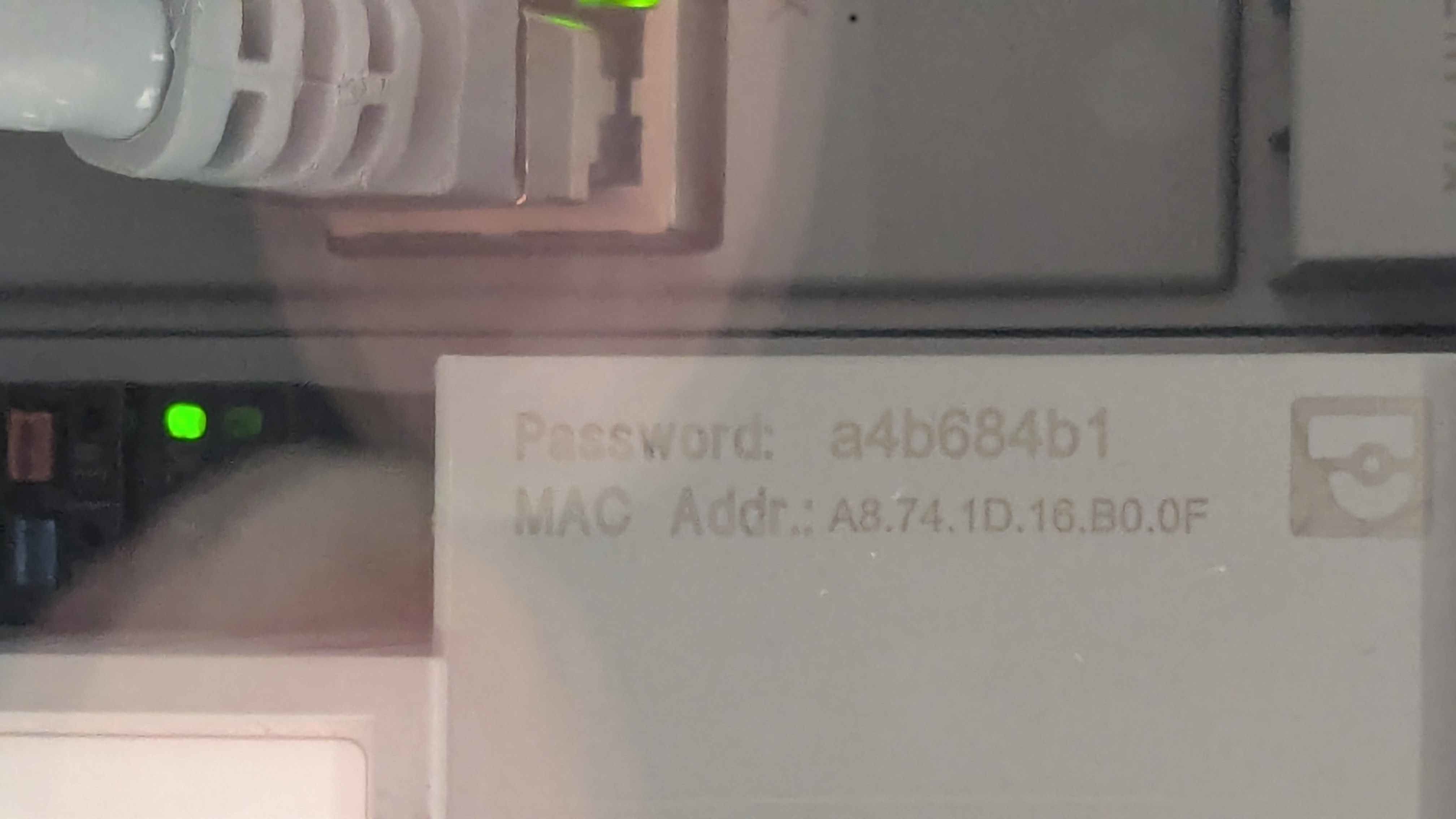
Okay I'm in, and with the SSH connection I can easily read the ghostnet.log file, giving me the second flag — and the whole network configuration? Damn. 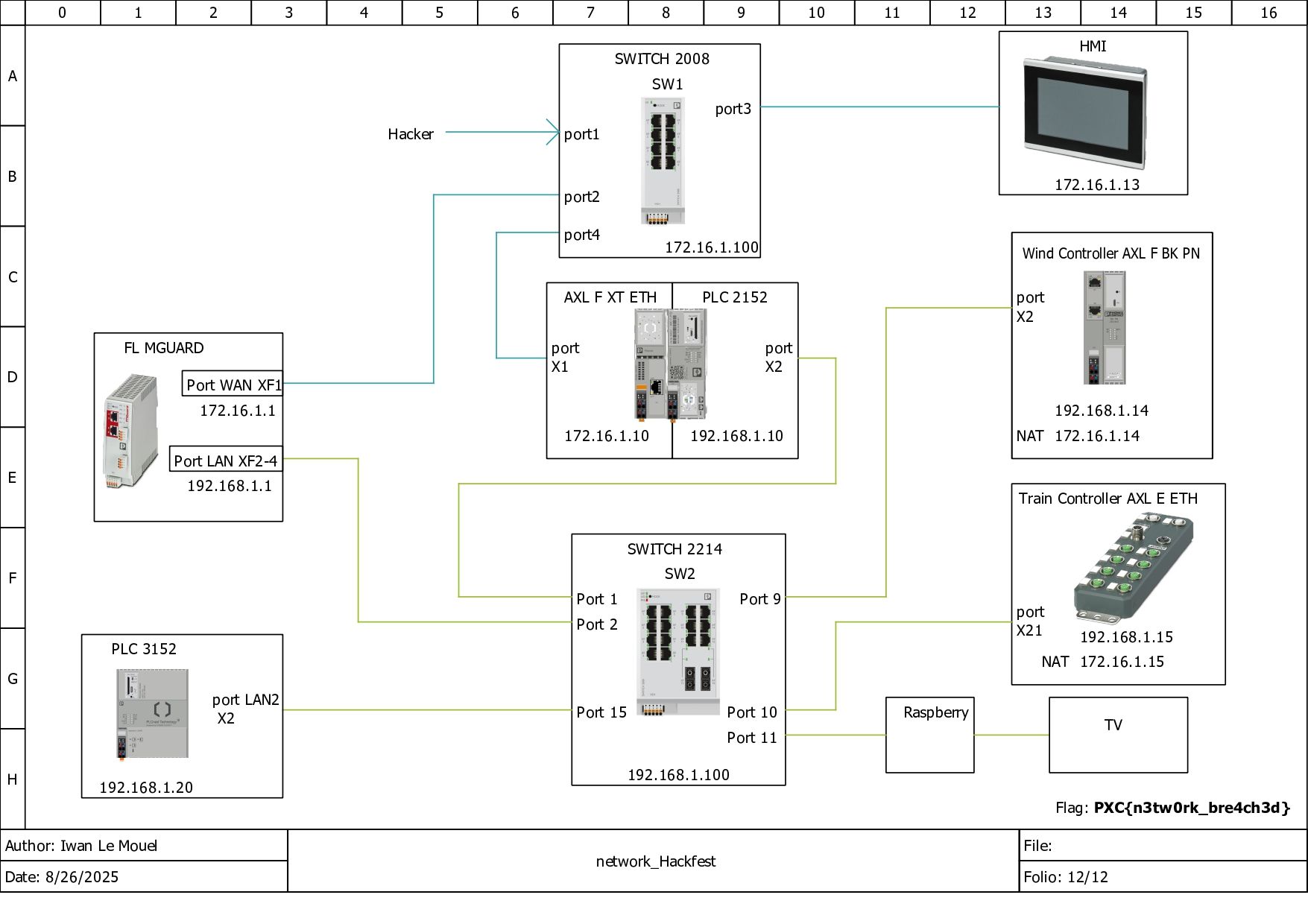
Break things
(Spoiler: I was not)
The next step is "stop the train!"
Ohhh yeah, hold up — let's take a moment to give you the full context of the challenge. The "intelligent system" is controlling parts of an intelligent city:
- There is, as mentioned before, a water container that fills up.
- There is a train that runs regularly through several stops.
- And there are some wind turbines (we'll get to those in a bit).
I tried things like killing the process but I wasn't root (yet).
OK, OK... let's take a step back. Oh wait, there is a tool to control a PLC AXL controller called PLCnext Engineer . Let's download it and see if we can connect to the device.
(Red flag: it's only for Windows.)
OK so... let's set up the controller. Here's the IP, here's the model.
What's this stop button? Oh — the train is stopped now!
GIMME FLAG 3!
Getting in the firewall
There is an MGuard firewall on the network, and the next flag is to get into it.
Oh shit, this is one of the $500 prizes. WTF?
Ok ok...
I didn't have direct access to the private 192.168 network, but there was a 172.16 IP for the MGuard which was completely locked.
The controller I had access to from the 172.16 network did have access. Indeed, if I tried to SSH to 192.168.1.1 when I was already SSH'd into 172.16.1.10, it asked me for a password.
After a bit of skill issue... 
I managed to create an SSH tunnel.
At some point I even modified the sshd config and broke control so it would reload on reboot.
Not gonna lie, I don't know if that helped. XD
But ANYWAYS...
Now I have access to the web manager login page of the MGuard.
Wait wait wait...
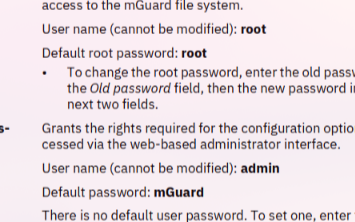 Cannot be modified????
> the challenge designer: well you can break as much as you want... it'll just be a bit long to reset it all
> me: so I can brute force?
> the challenge designer (with a side eye): maybe
> me: like with rockyou and all?
> the challenge designer (even bigger side eye): sure
Ok so let's brute force this MGuard.
I made a little Python script to send POST requests to the login page with rockyou.txt.
Let's try with the root username...
Damn that's long...
> me: you sure that with rockyou it will work?
> the challenge designer: with cough ROCKYOU cough it should work
Ok so let's try with admin.
I didn't even have the time to start talking before it was done.
And the password was rockyou.............
Now I can simply add my IP as allowed in the firewall rules, giving me access to this flag!!!
Wait, I'm the first one? So I win the $500 prize?! DAMN!!!!!
Right after that I chatted with the second person who got into the firewall, and he told me he was the one who won the $3,000 bounty last year... And I still managed to be first in the firewall. Damn, I feel good.
Last step: Wind turbine takeover
The last step is to take control of the wind turbines.
After some reading I saw the component used an Ethernet protocol to communicate. It was a real struggle to understand, but to make it short: it assigns names to MAC addresses and there is a tool on the PLCnext Store to do exactly that.
So I downloaded the tar.gz of the command, copied it to the AXC F 2152 (I didn't even need to go through the firewall), unzipped it, found the MAC address associated with the wind turbine service, and used the command to rename the device.
And just like that, it stopped.
Conclusion
If you read carefully, you remember the challenge technically doesn't stop there.
Indeed there is still the real bug bounty. But even the three of us who managed to stop the wind turbine together did not go further.
We got some leads to explore as clues on where to begin, but nothing more.
The way I measure my fun on a challenge is usually tied to how much I learned and OH BOY did I learn!
I'd like to thank Phoenix Contact for putting their product to the test like that. It's not something every company would do, and yet this is how both sides learn.
I'm eager to see them again next year, and I hope more companies like them dip into the cyber community.
Youllou out